


Check out the Wild Hearts controller buttons and PC keybindings.
There are a lot of controls and keybindings to learn in Wild Hearts. From hunting Kemono to crafting Karakuri, there’s a button for just about everything. Whether you’re playing on PC with a keyboard, using a controller, or playing on a console, we’ve got all the information you need to get up to speed with which button does what.
Wild Hearts PC keybindings
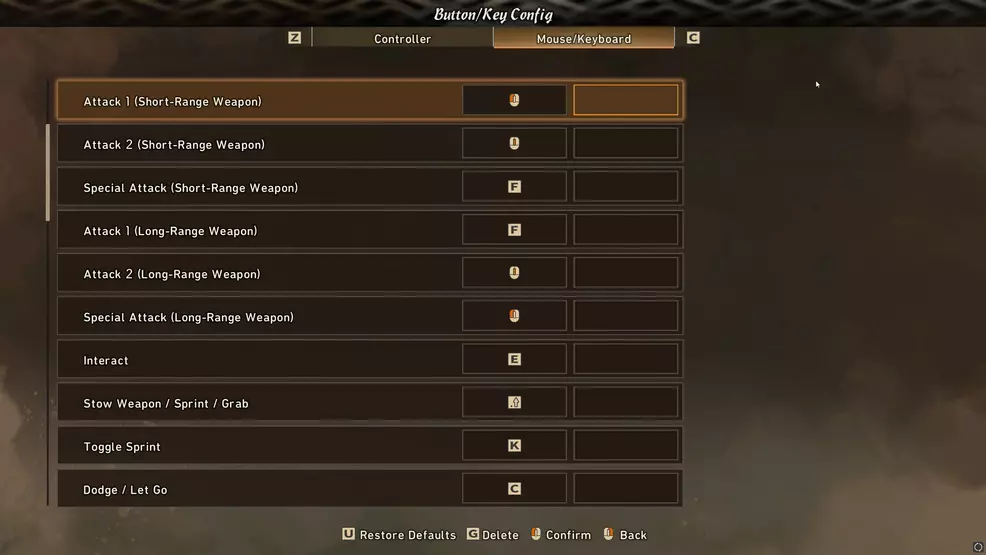
Wild Hearts players on PC using a keyboard and mouse have a ton of actions they can perform. While controller users will have multiple actions applied to one button, PC players have dozens of keys to utilize. For this reason, it can actually be tough to keep track of what action belongs to which keystroke.
| Keyboard | |
|---|---|
| Action | Button |
| Move forward | W |
| Move Backward | S |
| Move Left | A |
| Move Right | D |
| Attack 1 (Short-Range Weapon) | Left mouse click |
| Attack 2 (Short-Range Weapon) | Scroll click |
| Special Attack (Short-Range Weapon) | F |
| Attack 1 (Long-Range Weapon) | F |
| Attack 2 (Long-Range Weapon) | Scroll click |
| Special Attack (Long-Range Weapon) | Left mouse click |
| Interact | E |
| Stow Weapon / Sprint / Grab | Shift |
| Toggle Sprint | K |
| Jump | Spacebar |
| Crouch | X |
| Lock-On / Camera Reset | R |
| Hunter Vision | V |
| Enlarge Flying Vine Reticle | Right mouse click |
| Karakuri Stance | Right mouse click |
| Toggle Karakuri Stance | Tab |
| Karakuri Disassembly Stance | H |
| Basic Karakuri 1 | E |
| Basic Karakuri 2 | Z |
| Basic Karakuri 3 | Q |
| Basic Karakuri 4 | C |
| Dragon Karakuri Configuration | Enter / Left mouse click |
| Dragon Karakuri Selection 1 | 1 |
| Dragon Karakuri Selection 2 | 2 |
| Dragon Karakuri Selection 3 | 3 |
| Dragon Karakuri Selection 4 | 4 |
| Dragon Karakuri Selection 5 | 5 |
| Dragon Karakuri Selection 6 | 6 |
| Dragon Karakuri Selection 7 | 7 |
| Dragon Karakuri Selection 8 | 8 |
| Dragon Karakuri Selection 9 | 9 |
| Dragon Karakuri Selection 10 | 0 |
| Dragon Karakuri Selection: Next | E |
| Dragon Karakuri Selection: Back | Q |
| Dragon Karakuri: Change Page (Up) | Scroll up |
| Dragon Karakuri: Change Page (Down) | Scroll down |
| Health Recovery | Q |
| Food | Z |
| Reaction | L |
| Chat Wheel | G |
| ID Display (Wheel Showing) | 1 |
| Free Input (Wheel Showing) | 2 |
| Chat Screen (Wheel Showing) | 3 |
| Menu: Map | M |
| Options | Esc |
| Guide Window Controls | O |
| Confirm | Left mouse click / Enter |
| Cancel | Right mouse click / Esc |
| Previous Tab | Z |
| Next Tab | C |
| Previous Tab 2 | Q |
| Next Tab 2 | E |
| Next Page | Left arrow |
| Previous Page | Right arrow |
| Next Page (Down) | Down arrow |
| Next Page (Up) | Up Arrow |
| Screen-Specific Control 1 | G |
| Screen-Specific Control 2 | R |
| Screen-Specific Control 3 | Tab |
| Screen-Specific Control 4 | H |
| Screen-Specific Control 5 | U |
Wild Hearts controller buttons
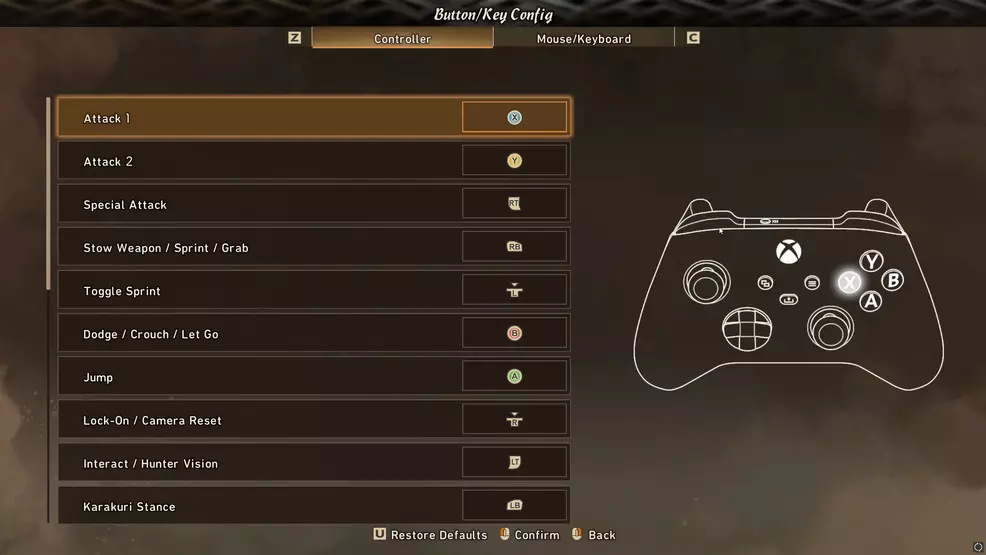
Xbox and PlayStation players, even some PC players, will need to know the buttons for Wild Hearts on controller. A lot of actions are mapped to the same button and what that button does will depend on context. Here are all the buttons for Xbox controllers and PlayStation controllers.
| Controller | ||
|---|---|---|
| Action | Xbox | PlayStation |
| Movement | Left stick | Left stick |
| Attack 1 | X | Square |
| Attack 2 | Y | Triangle |
| Special Attack | Right Trigger | R2 |
| Stow Weapon / Sprint / Grab | Right bumper | R1 |
| Toggle Sprint | Click left thumbstick | L3 |
| Dodge / Crouch / Let Go | B | Circle |
| Jump | A | Cross |
| Lock-On / Camera Reset | Click right thumbstick | R3 |
| Interact / Hunter Vision | Left trigger | L2 |
| Karakuri Stance | Left bumper | L1 |
| Toggle Karakuri Stance | Click left thumbstick | L3 |
| Karakuri Disassembly Stance | Click right thumbstick | R3 |
| Basic Karakuri 1 | Y | Triangle |
| Basic Karakuri 2 | A | Cross |
| Basic Karakuri 3 | X | Square |
| Basic Karakuri 4 | B | Circle |
| Health Recovery | D-pad up | D-pad up |
| Food | D-pad left | D-pad left |
| Reaction | D-pad down | D-pad down |
| Chat Wheel | D-pad right | D-pad right |
| Menu | View button (squares) | Touchpad |
| Options | Menu button (lines) | Options button |
It’s possible to edit all of the inputs on keyboard and controller. Simply open the Settings and navigate to the Controls tab. From there, select Controller Settings or Mouse/Keyboard Settings. This Controls screen also lets you edit how the camera snaps onto the target, how the Karakuri Stance functions, and the amount of time that constitutes a button is held. Be sure to check out our Wild Hearts page for more help on your hunts.